

 Written by
 Recently, many users of Jio Payments Bank have reported quarterly maintenance charges of ₹25 + GST. For low-balance users, this has even resulted in negative balances. Because of this, a large number of customers now want to close their Jio Payments Bank account.
If you’re facing the same issue, this detailed SEO-friendly guide explains exactly how to close your account — step by step.
Why Are People Closing Jio Payments Bank Accounts?
Here are the main reasons:
- ₹25 + GST quarterly maintenance charges
- Account balance going into minus
- No direct “Delete Account” option in the app
- Low usage of the account
If you no longer want to continue with the service, here’s how you can permanently close your account.
How to Close Jio Payments Bank Account (Step-by-Step Process)
Unlike many digital banks, Jio Payments Bank does not provide a self-account deletion option inside the app. You must contact customer support via email and submit a closure request.
Step 1: Send an Email for Account Closure
You need to send an email to:
📧 we.care@jiopayments.bank.in
📝 Subject Line: Account Closure
What to Write in the Email?
Keep it simple and clear. Example format:
I want to close my Jio Payments Bank account. Please initiate the account closure process. My account details are mentioned below.
No heavy formal language is required.
Step 2: Add Your Account Details in the Email
You must include the following details:
- Account Number
- IFSC Code
- URN
- Registered Mobile Number
Where to Find These Details?
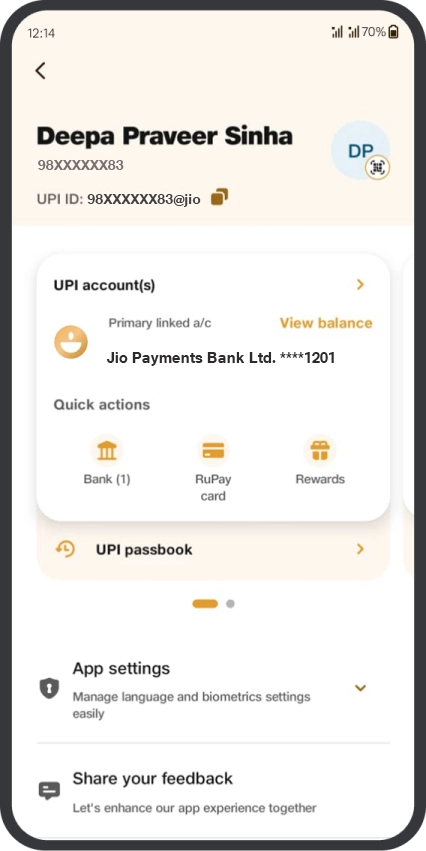
- Open the JioFinance App
- Go to the Bank section
- Tap your profile avatar (top-right corner)
- You will see:
- Account Number
- IFSC Code
- URN
- Registered Mobile Number
Copy these details and paste them into your email.
Step 3: Wait for Their Response
In many cases, users receive a response within an hour (response time may vary).
They may:
- Explain why charges are applied
- Try to convince you to keep the account
- Ask you to confirm your closure request
If you’re sure about closing, clearly confirm your decision.
Step 4: Submit Required Documents
To process account closure, they will usually ask for:
- Self-attested Aadhaar Card
- Self-attested passbook of another bank account (in your name, except Jio Payments Bank)
What Does “Self-Attested” Mean?
- Write “Self Attested” on the document
- Sign it
- Add the date
- Scan or take a clear photo
Attach these documents in your reply email.
Step 5: Maintain Required Closure Charges
Depending on:
- Account type
- Account age
- Pending charges
You may need to keep a certain amount in your Jio Payments Bank account for processing closure.
⚠️ Important: Ensure your account has sufficient balance before final confirmation.
Step 6: Final Confirmation & SMS
After document submission:
- They will create a closure request
- You will receive an SMS confirmation
- The SMS will mention the expected account closure date
For some users, additional verification may still be required.
Important Tips Before Closing Your Account
✔ Clear any negative balance or pending charges
✔ Keep copies of all email communication
✔ Do not delete the app until the account is officially closed
Frequently Asked Questions (FAQs)
1. Can I close Jio Payments Bank account from the app?
No. Currently, there is no direct account deletion option in the app.
2. How long does it take to close the account?
It usually starts within a few hours after email confirmation, but final closure may take a few days.
3. Are there any account closure charges?
It depends on your account type and age. Customer care will inform you about applicable charges.
4. What if my account balance is negative?
You must clear the negative balance before the account can be closed.
Final Words
Closing your Jio Payments Bank account is not instant, but it is possible through email communication. Follow the steps carefully:
- Send closure email
- Share account details
- Submit required documents
- Maintain necessary balance
- Confirm and wait for SMS